
SpliceKit
Final Cut Pro, unlocked. A Command Palette, MCP server, and an open plugin framework to do almost anything.
Free to download and MIT Open Source!
The Three Pillars
🎹 The Command Palette
One keystroke to anything.
Hit COMMAND+SHIFT+P inside the patched Final Cut Pro. Fuzzy-search 100+ built-in editing actions — blade, trim, color, speed, markers, effects, transitions, export — or type plain English and let Apple Intelligence (on-device, private) figure out what you meant.
Try saying…
- "add markers every 5 seconds"
- "slow this clip to half speed"
- "blade at every scene change"
- "remove all the silences"
- "add a cross dissolve"
No more menu hunting. No more memorizing shortcuts. No cloud.
🤖 The MCP Server
Claude (or any other LLM) can drive your editor — and teach it new tricks.
SpliceKit ships with an MCP server that exposes ~200 tools covering every major FCP subsystem. Point Claude Code, Claude Desktop, or any MCP-compatible AI client at it and you can say things like:
- "cut this 40-minute interview down to its best moments"
- "remove the silences from this podcast, add captions, and export"
- "assemble a rough cut from these clips, synced to the beat of this song"
It's not a chat wrapper around keyboard shortcuts. The MCP talks to Final Cut Pro's internal ObjC runtime directly — so it can read timeline state, inspect clips, blade, retime, color-correct, apply effects, and render without ever touching the user interface.
The editor that gets smarter every week
The first time you ask for something complicated, the AI might be a little clumsy. It's improvising — stitching together primitives, trial-and-error against your timeline, occasionally picking the long way around.
When that happens, don't settle for the workaround. Tell it to build the ability.
Every clumsy first attempt is a prompt to turn that workflow into a first-class feature. The editor you use six months from now is smarter than the one you installed today — and most of that improvement won't come from the SpliceKit team. It'll come from you, and from the community shipping plugins back.
🧩 The Plugin Framework
Everything is a plugin.
SpliceKit isn't a feature list — it's a platform. Once the SpliceKit dylib is loaded into Final Cut Pro, the entire ObjC runtime (78,000+ classes, including all private APIs) is open for plugins to use.
What a plugin can do
- Add new panels and windows inside FCP
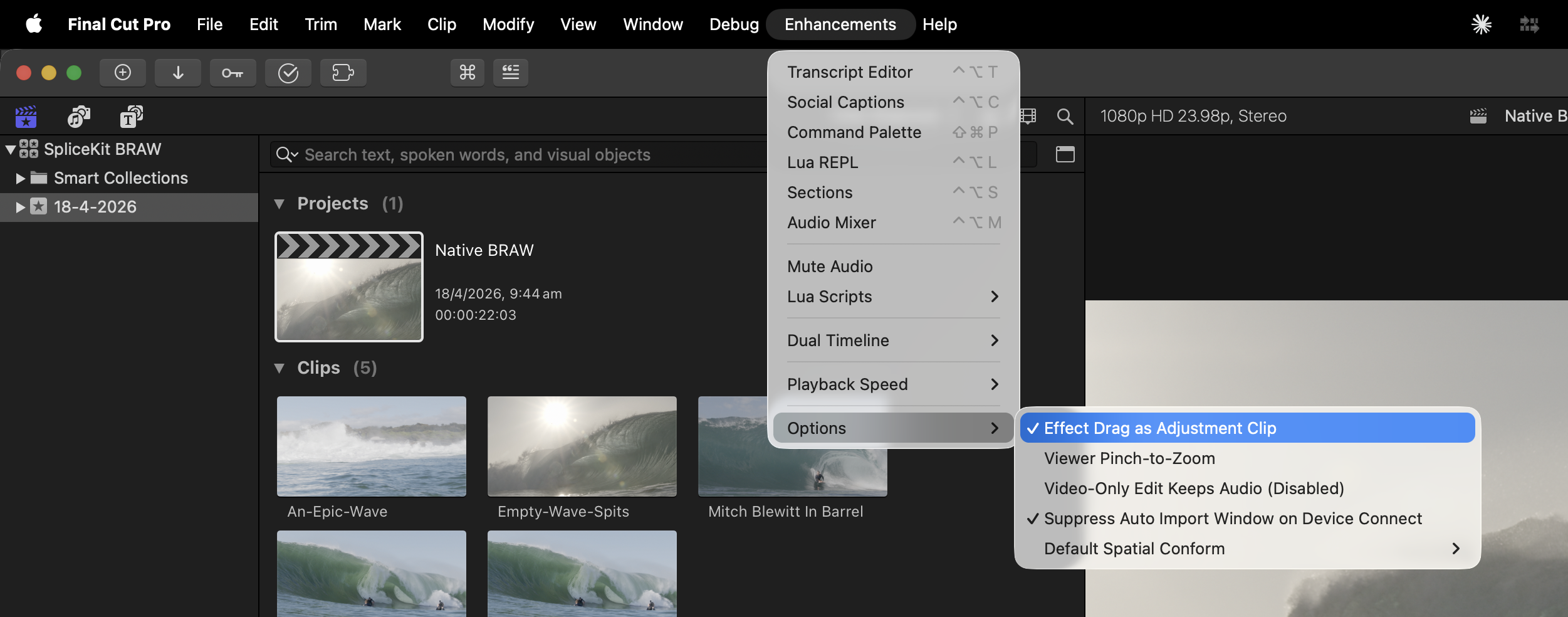
- Put buttons on the toolbar, menu, or Enhancements menu
- Register commands in the Command Palette
- Expose new tools over the MCP server
- Hook into timeline events, selection changes, and playback
- Ship custom Motion templates, FxPlug effects, and Workflow Extensions
- Be written in Objective-C / C++, Swift, Lua, or Python
And you can ask an AI to build one
Describe what you want. Hand the spec to Claude. It writes the plugin against the SpliceKit framework — the project ships full API reference docs designed for AI consumption.
Example Plugins
What Ships in the Box...
Every one of these is a plugin. They're bundled so you can use SpliceKit the day you install it, and they double as working examples for anyone building their own.
Text-Based Editor
Transcribe every clip on your timeline with on-device speech recognition (NVIDIA Parakeet — 25 languages, no cloud, with speaker diarization). Click a word to jump there. Select a sentence, hit Delete, and the video gets cut to match. Drag words to reorder clips. Export as SRT or plain text.
Audio Mixer
Mix by role, not clip-by-clip. Drop a compressor, EQ, or reverb on your Dialogue bus and every clip tagged Dialogue inherits it — past, present, and future. Retag a clip's role and it instantly picks up the new bus's processing. Set volumes, solo, and mute per role from one panel.
Sections
A color-coded section bar above the timeline that shows the shape of your edit at a glance. Name sections, color them, jump between them in one click — perfect for long-form edits, podcasts, multi-chapter projects, or anywhere you want to see structure without scrubbing.
Silence Remover
Point it at an interview or podcast recording and it finds and cuts every silent pause. Configurable threshold, minimum duration, and padding. Pure Apple-native AVFoundation + Accelerate under the hood.
Social Media Captions
Generate word-by-word highlighted, animated captions in 13 built-in styles (Bold Pop, Neon Glow, Karaoke, Typewriter, Bounce, and more). Captions land directly on your timeline as editable Motion titles.
Scene Detection
Finds every shot change in your footage using vImage histogram comparison. Add markers, blade the timeline, or both.
Beat Detection & Song Cut
Pulls BPM, beats, bars, and song sections from any music file. Hand Song Cut a music track and a folder of footage and get back a beat-synced music video on your timeline, with selectable pacing (natural, medium, fast, aggressive) or custom step weights.
LiveCam
A built-in webcam booth that records straight to your library or active timeline. Live preview with color adjustments, audio meter, and a subject-lift green-screen matte that works on people and objects (macOS 14+).
Pick "Transparent" as the green-screen color and LiveCam writes ProRes 4444 with a real alpha channel.
URL Import
Paste a YouTube, Vimeo, or Twitter link and pull it into your library as a real clip. Auto-discovers yt-dlp and ffmpeg from your shell PATH.
Batch Export
One command, every clip on your timeline exports as its own file — all effects, color grades, and transitions baked in.
Native Codecs
Drop Blackmagic RAW (.braw) and VP9/WebM files straight onto your timeline — no transcoding, no wrappers.
Blackmagic RAW requires BRAW Toolbox
To enable Blackmagic RAW support in SpliceKit you need to have a legitimate paid version of LateNite's BRAW Toolbox installed.
SpliceKit ships a BRAW RAW Processor and a VP9 decoder that plug into Final Cut Pro through Apple's MediaExtension framework, so the clips show up as first-class media with thumbnails, scrubbing, and full quality decode.
A huge unlock for anyone cutting Blackmagic camera footage or pulling down WebM video from the web.
Lots More!
Dual Timelines, FlexMusic, Montage Maker, OpenTimelineIO exchange, Lua REPL, in-process debugger and more.
Every one of them is code in Sources you can read, fork, or gut for parts.
Is it safe?
Whilst powerful tools like CommandPost have existed for over a decade, SpliceKit uses safe but powerful code injection to get inside Final Cut Pro, giving you complete control.
SpliceKit loads a custom framework directly inside Final Cut Pro's process space giving you full access to all everything INSIDE Final Cut Pro's codebase.
SpliceKit doesn't touch your original Final Cut Pro installation - so you can easily jump between the SpliceKit version of Final Cut Pro and the official version.
Your Final Cut Pro library is always fully compatible with Apple's shipping version - giving you confidence that if there is a SpliceKit bug, you can always jump back to the official release.
However, generally speaking, SpliceKit is actually MORE stable than Apple's version, fixing annoying bugs, like poor Effects Browser scrolling performance.
SpliceKit contains a bunch of amazing Final Cut Pro enhancements, allowing you to do things that was never possible before with CommandPost.
Like CommandPost though, it also has a Lua-scripting environment, so you can easily code your own Lua Scripts for powerful automation.
Because SpliceKit has a MCP server, Claude Code, Codex, ChatGPT and other cloud and on-device LLMs have full control over Final Cut Pro.
SpliceKit is free and open-source, and we encourage you to contribute.
The best place to chat about SliceKit is the FCP Cafe Discord.
Welcome to a new world for Final Cut Pro users... 🥳